How to Read Your LES (Leave and Earnings Statement)
How to read LES line by line: entitlements, deductions, allotments, BAH and BAS, the leave and tax blocks, and common errors to catch before payday.

Knowing how to read your LES, the military Leave and Earnings Statement, starts with not doing what most service members do: glancing at one number, the net pay at the bottom. That is a mistake, and it is the kind of mistake that quietly costs people hundreds of dollars over a career. Your LES is the single document that tells you whether the military is paying you correctly, whether your allowances match your real situation, how much leave you have banked, and where every dollar of your gross pay went before it hit your bank account. Learning to read it top to bottom takes about twenty minutes the first time and a couple of minutes a month after that.
This guide walks through the statement the way it is actually laid out, block by block, using 2026 figures where they are fixed and pointing you to the live tools where the number depends on your paygrade, location, or family situation. The goal is not to memorize rates that change every January. It is to recognize what each line should say, so that when something is wrong you catch it in the same month it happens instead of a year later during an audit.
If you want to sanity-check the single largest allowance on most statements while you read, keep the BAH calculator open in another tab. It pulls the published Department of Defense rate for your Military Housing Area, paygrade, and dependent status, which is exactly the figure that should be sitting in your entitlements column.
Where Your LES Lives and How Often It Changes
In the military, LES means your Leave and Earnings Statement, the monthly document that records what you earned, what was withheld, and how much leave you have banked. Active-duty Army, Air Force, Space Force, Navy, and Marine Corps members pull their LES from myPay, the Defense Finance and Accounting Service self-service portal. A fresh statement posts around the middle of each month for the end-of-month pay and again near the end of the month, and you can download a PDF of any of the last twelve months. Reserve and Guard members on a different pay cycle see statements that match their drill and active-duty periods. The Coast Guard runs its pay through a separate system but the statement carries the same kinds of fields.
The single most useful habit you can build is comparing this month's LES to last month's. Most of the document is identical from month to month. A figure that moved when nothing in your life changed is the first sign of an error, and a figure that did not move when something did change, a PCS, a promotion, a new baby, is the second.
The Identification Block
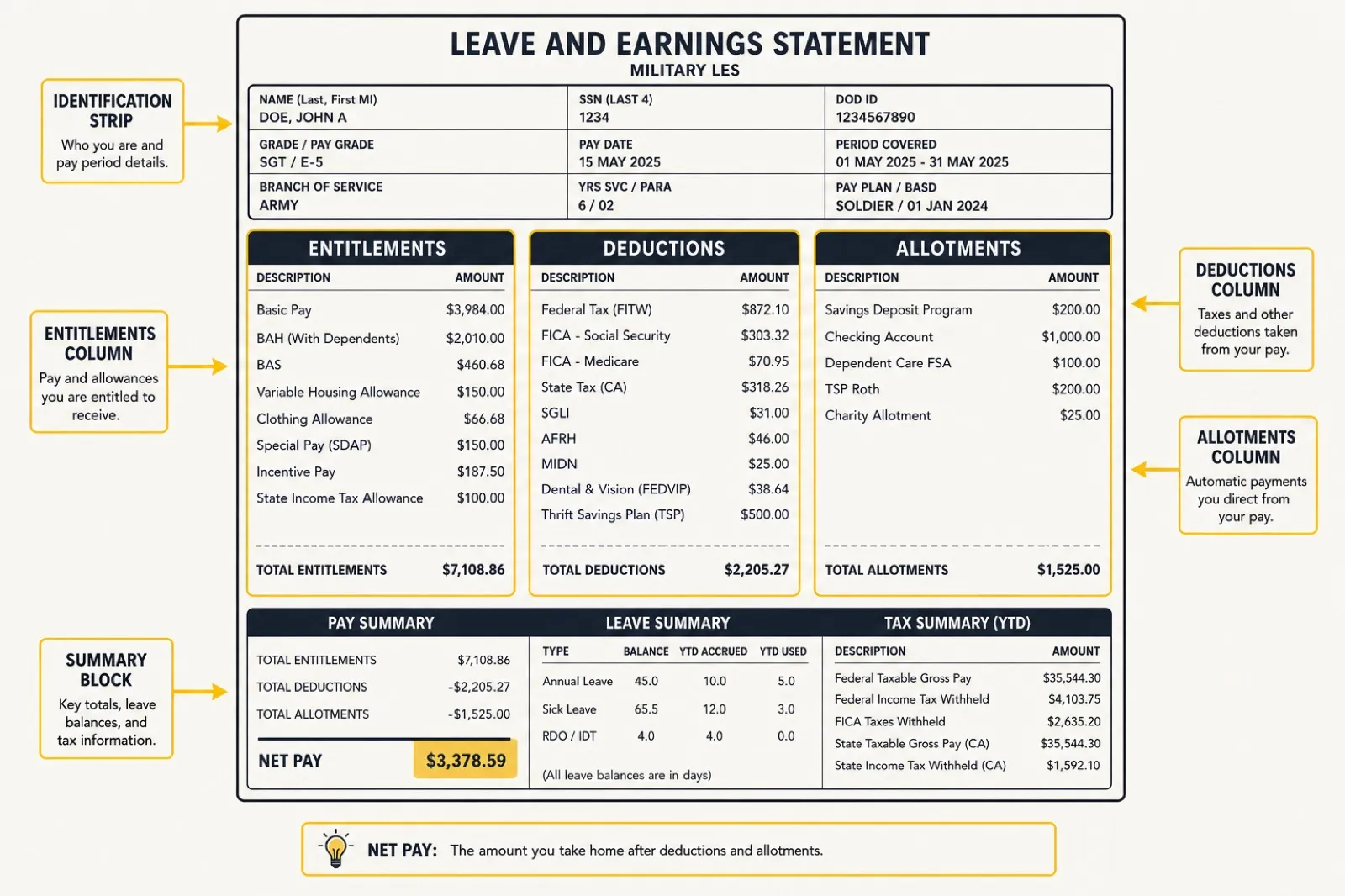
The top strip of the statement is the part people skim, but it sets the context for every dollar below it. Confirm these fields first, because an error here cascades into everything else.
- Name, SSN, and grade. Your paygrade drives your basic pay and your housing allowance anchor, so a wrong grade after a promotion is a real-money problem.
- Pay date (PEBD) and years of service. Your Pay Entry Base Date sets your longevity, which moves your basic pay up at each service milestone. If a prior-service period was never credited, this is where it shows.
- Branch, ETS, and SCD. Your Expiration of Term of Service and Service Computation Date affect leave accrual and separation timing.
- Dependents claimed and tax filing status. These drive your allowances and your withholding. A mismatch here is one of the most common causes of an over- or underpayment.
The Entitlements Column
Entitlements is the military word for everything the government is paying you. This column is your gross pay broken into its parts. Some of it is taxable, some of it is not, and the statement keeps them separate.
Basic pay
This is the taxable core of your paycheck, set by the published military base pay chart for your grade and years of service. For 2026, basic pay rose 3.8 percent across all grades, effective January 1, 2026, under the National Defense Authorization Act for fiscal year 2026. Reserve and Guard members read the drill pay chart instead, which pays in units of four-hour drill periods rather than a full month. Either way, your monthly basic pay should match the current pay table cell for your exact grade and longevity. If you were promoted or crossed a service milestone, confirm the new figure landed on the right month.
Basic Allowance for Housing (BAH)
For most members not living in government quarters, BAH is the largest single line after basic pay, and it is not taxed. The amount is tied to three things only: your Military Housing Area, your paygrade, and whether you have a dependent. The national average rate rose 4.2 percent for 2026, with the new rates effective January 1, 2026, but the average tells you nothing about your specific number. Run your exact situation through the BAH calculator and confirm the figure on your LES matches the published rate. If you live in the barracks or in family housing, you may see a partial rate or no BAH at all, which is normal. Members stationed overseas see OHA (Overseas Housing Allowance) instead, which works differently and is reconciled against your actual rent.
Basic Allowance for Subsistence (BAS)
BAS is your food allowance and it is also tax-free. Unlike BAH, it does not vary by location, paygrade, or dependents. For 2026 the rate is a flat $476.95 a month for enlisted members and $328.48 a month for officers, effective January 1, 2026. A small number of enlisted members in specific housing situations qualify for BAS II, which is exactly double the standard enlisted rate at $953.90 a month. If your BAS line shows a different number than these, that is worth a question at finance. The full breakdown lives in our companion guide on how BAS works in 2026, and you can model your own situation with the BAS calculator.
Special and incentive pays
Below the core three you will see any special pays you have earned: hazardous duty, flight pay, sea pay, hardship duty pay, language pay, and others. These appear and disappear as your assignments change, so this is a section worth watching closely. If you deployed to a designated combat zone, part or all of your pay may be excluded from federal income tax for that month, which shows up in how your taxable wages are calculated rather than as a separate line. Our guide on combat pay and tax-free zones explains exactly how that exclusion is applied.
The Deductions Column
Deductions are everything coming out of your gross pay before it becomes take-home. Some are mandatory, some you chose, and a couple are easy to get wrong.
Federal and state income tax withholding
Your federal income tax withholding is driven by the information on your tax election in myPay, the modern equivalent of the old W-4. Note that your tax-free allowances, BAH and BAS, are not part of the wages this is calculated on. If you live in a state with income tax, your state withholding is based on your legal state of residence, not the state you happen to be stationed in. Members who keep a home of record in a no-income-tax state and never change it can legally avoid state withholding entirely, which is one of the few genuine tax advantages built into military life.
Social Security and Medicare (FICA)
These two are not optional and not adjustable. For 2026, Social Security tax is withheld at 6.2 percent of your taxable basic pay up to the annual wage base of $184,500, and Medicare is withheld at 1.45 percent with no wage cap. These come out of basic pay and certain taxable special pays, not your tax-free allowances. The dollar amounts will move slightly as your pay changes, but the percentages are fixed by law, so you can check them with simple arithmetic against your basic pay.
SGLI
Servicemembers' Group Life Insurance is the term life coverage that is on by default unless you decline or reduce it in writing. As of mid-2025 the premium dropped to $0.05 per $1,000 of coverage per month. At the maximum coverage of $500,000, that is $25 a month, plus a flat $1 a month for Traumatic Injury Protection (TSGLI), for $26 total. If you carry less than the maximum, the premium scales down proportionally. Check that your coverage amount and beneficiary are what you intend, because this is one of the few benefits that pays out only when it is too late to fix.
TSP contributions
If you contribute to the Thrift Savings Plan, your election shows here as a deduction, split between traditional (pre-tax) and Roth (after-tax) if you use both. For 2026 the IRS elective deferral limit is $24,500, with an additional catch-up of $8,000 for members age 50 and older, and a higher catch-up of $11,250 for those who turn 60 through 63 during the year. Members under the Blended Retirement System also get government matching, which does not appear as a deduction but does show up in your TSP balance. Our TSP calculator projects how your current contribution rate compounds over a career.
Other deductions
You may also see meal deductions if you are required to eat in a dining facility, AFRH (the Armed Forces Retirement Home fee, a small mandatory cents-per-month charge), repayment of an advance or debt, and TRICARE dental premiums if you enrolled. Each should tie to something you recognize. An unexplained debt repayment line is the single most common reason members discover a months-old overpayment.
The Allotments Column
Allotments are payments you set up yourself to route part of your pay automatically to a third party: a car loan, a savings account, an insurance company, child support. They are not deductions the military imposes; they are transfers you authorized. The statement separates discretionary allotments (the ones you can start and stop freely, capped in number) from non-discretionary ones (court-ordered support, certain debts).
The thing to watch here is allotments that should have ended but did not. A car gets paid off, a policy gets cancelled, and the allotment keeps sending money because nobody told the system to stop. Reviewing this column once a quarter catches money that is leaking out on autopilot.
The Leave Block
This is the part of the LES people understand the least and need the most, especially before they separate or retire. Military leave is accrued, not granted in a lump sum, and the leave block tracks it with a small set of fields.
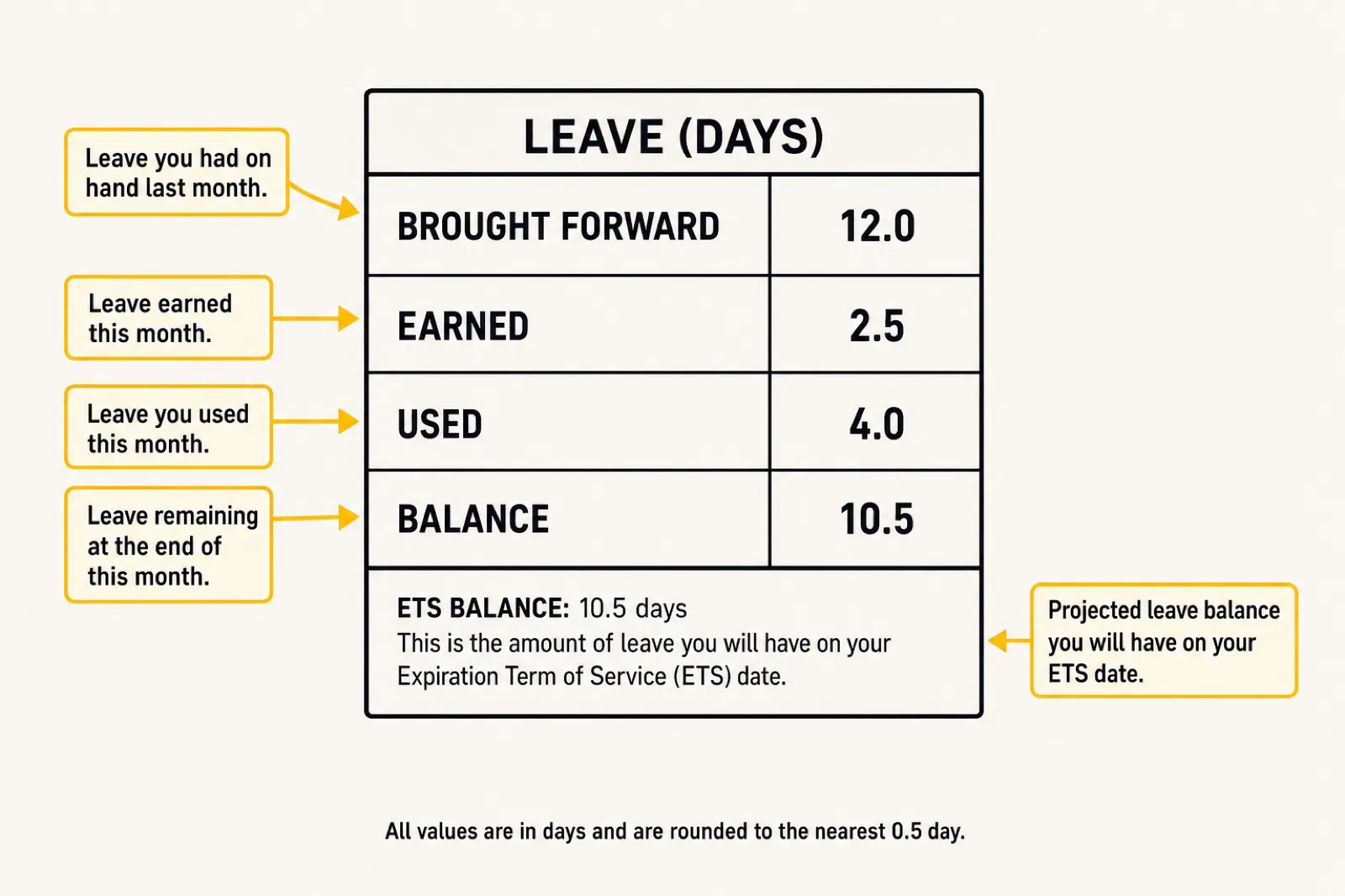
- BF Bal (brought forward balance). The leave you carried into the current fiscal year.
- Ernd (earned). You accrue 2.5 days of leave per month, which works out to 30 days a year.
- Used. Leave you have taken this fiscal year.
- Cr Bal (current balance). What you have available right now.
- ETS Bal (projected balance). What you are projected to have at your separation date if you take no more leave.
- Use/Lose. The number of days above the cap you will lose at the end of the fiscal year if you do not use them.
The cap matters. You can normally carry no more than 60 days of leave across the end of the fiscal year on September 30, and anything above that is forfeited unless you are covered by a special carryover authority such as one tied to a deployment. If your Use/Lose field is showing days in the summer, that is your warning to schedule leave before you lose it. The leave block also tracks any combat-zone special leave accrual separately, which follows its own carryover rules.
The Tax and Wage Block
Near the bottom, the statement summarizes your year-to-date wages and the taxes withheld against them. This is the block that feeds your W-2, so it is worth a look every few months rather than a panic in February.
- Wage Period and Wage YTD. Your taxable wages for the month and for the year so far. Remember that BAH, BAS, and any combat-zone-excluded pay are not in this figure, which is why it looks lower than your gross.
- M/S, Ex. Your marital status and exemptions as the withholding system has them recorded. A wrong value here is the usual cause of withholding that feels too high or too low.
- Tax YTD. Federal income tax withheld so far this year.
- State. Your state code and state tax withheld, tied to your legal residence.
If your Wage YTD and Tax YTD look badly out of proportion to your pay, that is the moment to check your tax election in myPay rather than wait for a refund or a bill.
Remarks and the Thrift Savings Plan Section
The remarks block at the very bottom is free-text and easy to ignore, which is a mistake. Finance uses it to flag exactly the things you most need to know: a pending pay adjustment, a debt about to start, a BAH recertification due, a document missing from your record. Read it every month. The separate TSP section near the bottom summarizes your contributions and, for Blended Retirement System members, the government's matching contributions year to date.
How to Catch an Error Before It Compounds
Pay problems in the military almost always start small and grow because nobody noticed. A wrong dependent count, a BAH rate that did not update after a PCS, a special pay that kept running after the assignment ended. The military will eventually reconcile an overpayment, and when it does, it recovers the full amount, sometimes all at once. Catching the error early is entirely on you.

A simple monthly routine prevents almost all of it:
- Open this month's LES next to last month's and scan for any line that changed.
- For every change, name the reason. A promotion, a move, a new dependent, a tax election update. If you cannot explain it, that is your flag.
- Verify your two biggest variable lines against the live tools: BAH through the BAH calculator and your retirement trajectory through the TSP calculator.
- Read the remarks block in full.
- Confirm your leave balance is tracking the way you expect, and watch the Use/Lose field as the fiscal year closes.
When something is wrong, the fix starts at your servicing finance office or through a myPay ticket, and you want documentation, the orders, the marriage certificate, the dependent enrollment, in hand before you go. The earlier you raise it, the smaller the correction.
Frequently Asked Questions
How do you read an LES?
Read it block by block from the top down rather than jumping to net pay. Confirm the identification block (grade, dependents, tax status), check each entitlement against the published rate, account for every deduction and allotment, then verify your leave balance and year-to-date wage totals. The fastest habit is comparing this month's statement to last month's and naming the reason for any line that changed.
What does LES mean in the military?
LES stands for Leave and Earnings Statement. It is the monthly pay document that shows your entitlements, deductions, allotments, leave balance, and tax totals in one place, and it is the record you use to confirm the military is paying you correctly.
What is an LES in the military?
An LES is your official military pay stub, issued each month through myPay for most active-duty members. It functions as proof of income, a leave tracker, and a tax record, and it is the source document behind your year-end W-2.
What is BAH on a military pay stub?
BAH is the Basic Allowance for Housing, a tax-free entitlement that covers off-base housing costs. On your pay stub it is usually the largest line after basic pay, and the amount depends only on your Military Housing Area, paygrade, and dependent status. Confirm yours against the published rate with the BAH calculator.
What does BAS mean on a pay stub?
BAS is the Basic Allowance for Subsistence, your tax-free food allowance. Unlike BAH it does not vary by location, paygrade, or dependents. For 2026 it is a flat $476.95 a month for enlisted members and $328.48 a month for officers.
How do you read a military pay chart?
Find the row for your paygrade, then move across to the column for your years of service to read your monthly basic pay. The base pay chart sets the taxable core of your paycheck; the drill pay chart shows the per-drill amount for Reserve and Guard members. The figure on your LES should match the cell for your exact grade and longevity.
The Bottom Line
Your LES is not a receipt you file and forget. It is the only place the military shows you, in one document, whether it is paying you what you are owed, where every dollar is going, and how much leave and retirement you have banked. The numbers that matter most each month are the variable ones: your BAH, any special pays, your deductions, and your leave balance. Fixed figures like the 2026 BAS rates, the 6.2 percent Social Security rate, and the SGLI premium you can verify with arithmetic in seconds.
Spend the twenty minutes to learn the layout once, build the two-minute monthly habit of comparing statements, and keep the BAH calculator handy for the line that swings the most. Over a career, that small habit is worth real money, and it is the difference between catching a pay error in the month it happens and discovering it as a four-figure debt a year later.